 Sign in
 Tweet
Tweet Share
Share
Change Cursor 3.0??? In the big 26???????????
Cool to see such an update for a pretty useful, but an ever-so aging tool. The cursor manager looks pretty well laid out for cursor settings.

Cursor tools update (expect it when you see it)
Published by Vlasta on April 23rd.
Another update is in the works, this time focused on software rather than the web. A new version of the cursor changing utility for Windows is planned.
Some of you may remember the old Change Cursor tool, which integrated with the Windows shell and allowed changing cursors directly from the context menu in Explorer. That tool worked fine on older versions of Windows, but changes in Windows 10 and 11 effectively broke it. Instead of trying to patch it further, a new version is being built with current systems in mind.
The updated tool will again support context menu actions for .cur and .ani files, but it will also come with a standalone application for managing complete cursor schemes. The new name is RealWorld Cursor Manager.
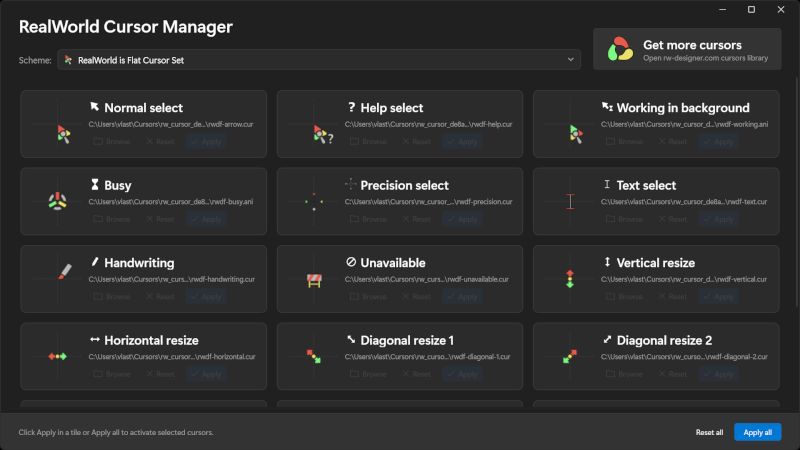
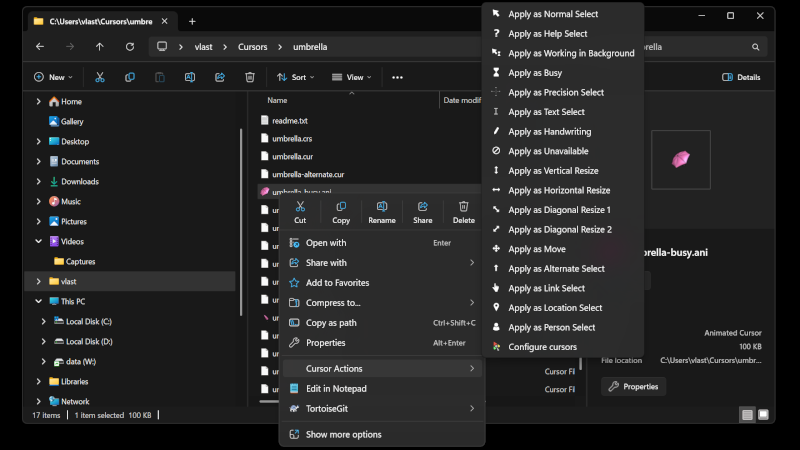
The application is designed for Windows 11 and includes support for dark mode. It allows quick application of cursor schemes by simply dragging and dropping files into the window, or by opening them manually. Supported formats include .crs (cursor scheme files) and .zip archives containing both schemes and cursors.
To unlock the full power of the software, there will be a small change on the website. Cursor library pages will include a link using a custom rw-cursor: protocol. If you have the application installed, clicking this button will launch it, download the selected scheme, show previews of the included cursors, and allow you to apply everything at once. In practice, this means going from browsing a cursor set to having it active on your machine in just two clicks.
Downloaded schemes are stored in a local library, and you can switch between them using a combo box in the header of the application (and easily delete them when you don't like them anymore).
If everything goes as planned, the application will also ship with a few built-in cursor schemes. This ties into next month's contest, which will be slightly different. Authors who want their cursor sets included with the application can participate by creating complete schemes (covering all roles, including high-resolution variants up to 64×64 pixels). Only sets suitable for long-term use will be considered. More details will follow.
The application will be free and available through the Microsoft Store.
 Recent comments

Nice update. Will make changing cursors much easier in my opinion. 😊
