3D model, icon, and cursor thumbnail extractor
Windows Explorer is able to display files and folders using various methods.
One of these methods uses thumbnails. Windows Explorer can extract thumbnails
from images, animations, web pages, and some Microsoft Office files.
Fortunately the Windows Explorer is able to work with 3rd party plug-ins and
display thumbnails for virtually any document type. The extension available on
this page allows thumbnail extraction for all document types supported by RW tools,
including images, icons, static and animated cursors, and supported 3D formats (U3D, R3I, and 3DS).
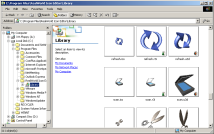
Windows Explorer offers multiple methods for files visualization. This extension cooperates with Explorer and allows it to display thumbnails of supported 3D file formats.
|
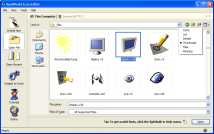
The thumbnails visualization mode is available also when opening or saving files in RealWorld products.
|
How to install
- Download the installer below and launch it.
- Near the end of the installation a dialog appears. This dialog list the supported file types.
Check the file types that should be handled by this extension.
- You can later find this dialog in your Control Panel and you can
enable and disable the handled file types at will. If you install
an application and associate it with one of the supported file types,
it is likely that you will need to re-enable the thumbnail extractor afterwards,
because the association may invalidate the assigned thumbnail extractor.
Important notes
- The handled file types apply to your own user account only.
- It is recommended to remove the handled file types using the RealWorld Thumbnails Control Panel before uninstallation.
- You will need to switch to the appropriate view mode in Explorer or open/save dialog to actually see the thumbnails. You
can do this for example from folder's context menu.
- The rendering device used to create thumbnails can be configured using control panel or in RealWorld Icon Editor.
Click "Tools"->"Manage Output Devices..." and select the one called "ShellExtension". This device
will appear after at least one thumbnail was generated.
- The extension may interfere with your file operations. You may be unable to delete or overwrite a file while it is being used to create a thumbnail.
- Great care was taken when designing this extension not to compromise the stability of Windows Explorer.
Only tiny portion of the task is performed inside Windows Explorer and the rest is delegated to a separate
process that cannot affect Windows Explorer at all.
- Use this extension at your own risk. The authors are not responsible for any damage caused by this software.
Known problems
Windows Vista caches the thumbnails much more aggressively than XP (and it also uses
them in many more places). Vista will not generate the thumbnails for files if it already
thinks is has the thumbnails. After installation and configuration you may notice that
the thumbnails are not created for old files, but they appear if you create copy of the
old file (though only for the copy). XP had the "Refresh Thumbnail" command in context
menu to resolve these cases, but Vista lacks it. You can use the Disk Cleanup tool in
Start Menu\Programs\Accessories\System Tools to remove the old cached images.
Downloads
Version 3.0 of ReaWolrd Thumbnails is capable of displaying thumbnails created in RealWorld applications up to version 2010.1.
Windows XP, Vista, and Windows 7: RWThumbnails32.msi
Windows x64 editions: RWThumbnails64.msi
You must pick the correct version for your Windows. 64-bit will only work on 64-bit systems and the same is true vor 32-bit systems.
 Recent comments
Show older posts
 767
on April 17th
0
767
on April 17th
0
😠😠😠😠😠
bro stupid - by jay about 5 hours ago
just here
on April 20th
0
uhhh I don't know how to do this...
jeff
on April 20th
0
n111116er
on April 29th
0
how tf do i change it tho
Pomni_Fan
on May 1st
0
HOW DO I DO THIS!?!?!?!??!?!??!?!??!?!?!??!?!??!?!?!?😠😠😠😠😠😠 It's so mean!😠
サマー・ジョー・ママ
on May 6th
0
サマー・ジョー・ママ
you bro chinna - by jay about 5 hours ago
idk
on May 13th
0
Bailey wancr
yesterday
0
malmal
about 16 hours ago
0
love this site
enhypen is 7
jay
about 5 hours ago
0
 Sign in
 reddit
 Facebook share