 Sign in
 Anonymous
on November 5th 2012
0
Anonymous
on November 5th 2012
0
Is it a bitmap or just whatever a line or object is on the plane? 😉

Raster or bitmap image refers to an image stored by a computer in a specific way.
Raster images are composed of pixels. Each pixel has an assigned color (and eventually another parameter, for example transparency). Pixels are arranged in rectangular net of given width and height.
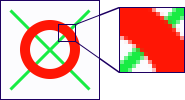
Raster image - squares (pixels) are visible in the zoomed-in area.
Raster images can be modified by changing colors of individual pixels. Pixels can be changed one by one or in groups by drawing tools. For example the line tool can create an effect of a drawn line by changing colors of pixels laying along the defined line.
Due to the nature of raster images, once the the line tool changes the pixels (user applies the operation), the information about them forming a line is lost. Therefore, it is impossible to change a line after it was drawn.
The fundamental property of a raster image is its size - the width and height in pixels. When creating raster images, you can specify their size.
For more info visit read the introduction to computer images.
 Recent commentsAnonymous
on November 5th 2012
0
Recent commentsAnonymous
on November 5th 2012
0
Is it a bitmap or just whatever a line or object is on the plane? 😉
when you are going to create a raster image and there is the option to change height and width of canvas, what is the 'resolution' option for? 😞
Anonymous
on July 10th 2015
0
How to save into Animated PNG files after creation?
If your file is an animation, just go to File->Save as... and pick Animated PNG type.
 faih123
on October 26th 2015
0
faih123
on October 26th 2015
0
what is the normal width and height ? 😞
Anonymous
on March 28th 2017
0
C'est très bien le concept de crée une aplication pour crée des cursor mais n'hésiter pas à agrandir les pages des créations ! Merci de votre compréhension.
 csid2136
on December 6th 2020
0
csid2136
on December 6th 2020
0
| f |
Anonymous
on March 25th 2021
0
como volver al diseño original de la barra de herramientas . lo tengo bloqueado
Anonymous
on May 14th 2022
0
| -) 😎 😮 😞 😊 😉 |
Anonymous
on July 28th 2022
0
para que un image no ten ga pixesls tiene que es tar con medida 2000x2000
Find out how Vista icons differ from XP icons.
See how RealWorld Icon Editor handles Vista icons.

 reddit
 Facebook share