 Sign in
 mathy
on October 3rd 2011
0
mathy
on October 3rd 2011
0
Hmm. I think I'll download it 😎 .

The Create Shortcut operation is an operation plug-in for RealWorld Icon Editor. It is not installed by default, but it can be downloaded from the Online page.
This operation creates a tiny executable file that acts as a shortcut to a web page, application or document on your computer. The current icon is embedded and since the product is a executable file, there is no annoying overlay arrow as with ordinary shortcuts.
After the plug-in is installed, you can start it by clicking on Create shortcut... in Icon menu (an icon must be opened).
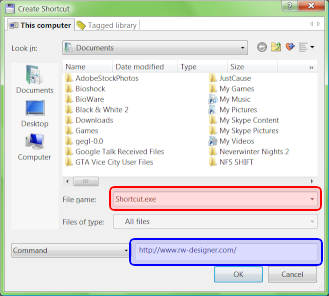
The operation asks you to select a name and location of your new shortcut  - though you can move it later.
The most important action is selecting a target of the shortcut  .
.
You can simply type a web address there (do not forget the http). Examples:
Or you can create shortcuts to applications, folders, or documents on your computer. For example:
If you experience problems, verify that the path given to the document is typed correctly. Shortcuts to documents on your own computer will most likely not work when the shortcut is sent to someone else or moved to another computer.
 Recent commentsmathy
on October 3rd 2011
0
Recent commentsmathy
on October 3rd 2011
0
Hmm. I think I'll download it 😎 .
Anonymous
on March 21st 2012
0
LOL 😊 :-P
Anonymous
on December 21st 2012
0
Symantec Endpoint sees each shortcut.exe as a "Suspicious.Cloud.5" false positive.
LoganDark
on March 10th 2013
0
I'm downloading all the plug-ins 😁 they are all awesome 😁
Anonymous
on March 7th 2014
0
10 detections in Virustotal.com
https://www.virustotal.com/en/file/a8165334d873a3ca11aedf7071e26affeb85e3191d2f56046f46bd2734dfbece/analysis/1394222775/
All of them false positives, of course the .exe is weird, it is a small, special single-purpose thing generated by a graphic application, not a real compiler. If you want to do good, don't let the AV authors know they have a false... They are the ones who can fix it, not me.
Shortcuts can be created in Windows.
Find out how Vista icons differ from XP icons.
See how RealWorld Icon Editor handles Vista icons.


 reddit
 Facebook share