 Sign in
 arlorecchia123@gmail.com
on December 12th 2025
0
arlorecchia123@gmail.com
on December 12th 2025
0
nah wtffffffffff

 |
Web shortcut producerMay 7th 2006 |
What's it good for?This online service creates shortcuts to web pages with embedded icons. The shortcuts do not have an arrow in the corner, because they are tiny executables. If you are an internet user, you can create custom shortcuts for your favorite websites and place them directly on desktop. Download example shortcut to this page: Icon Shortcut Maker.exe (see preview on the image ->) |
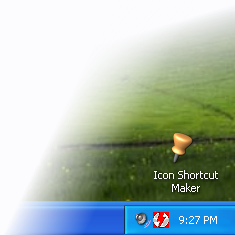 |
This service produces a tiny Windows exe file containing the specified icon and the address of a web page. When the application is run, it opens the web page in the default web browser.
Running executable files downloaded from internet may be dangerous and shortcuts created by this service are executable files. We guarantee that the shortcut files do exactly what is described on this page and nothing else, but we recommend you to check them with your antivirus anyway.
If you are a webmaster, you may prepare shortcuts with icons for your visitors and let them download the shortcuts from your web pages.
If you like this service, please consider linking to this page and recommending it to your friends.
 Recent commentsarlorecchia123@gmail.com
on December 12th 2025
0
Recent commentsarlorecchia123@gmail.com
on December 12th 2025
0
nah wtffffffffff
For anyone wondering about how safe these files are, here's a VirusTotal scan I did of a shortcut I generated from here: https://www.virustotal.com/gui/file/023d0406379bf09994eddb2ef048d60180bf51e692bc497aea0103dc60e3edc1?nocache=1
some dude that writed comment
on January 21st
0
Triage rated the file's threat score as a 3/10 but virustotal marked it malicious backdoor and trojan wtf is this false-positivve
Mario
on March 31st
0
?😮
 cuteie
on April 6th
0
cuteie
on April 6th
0
y`all are cray cray!!!!!!!!!!!!!!!!!!!
😠😞😴😠😞😴😠
dt_lover
on May 13th
0
huh???
mimi
on May 31st
0
todas putas menos mama :3
 iPhonePlay Plus 26 (WinXP)
on July 20th
0
iPhonePlay Plus 26 (WinXP)
on July 20th
0
theses comments are out of hands
Cezar
on July 30th
0
Yes
theses comments are out of hands too
n I g g e r
vhn
on August 7th
0
calm down all
 reddit
 Facebook share